


OOM Profiler Investigation
Several days, we met a incident about OOM Killer, this event happened and doesn’t leave any traces only provide a obscure hint:
[32649828.020667] Out of memory: Kill process 2012894 (`keydb-server`) score 1015 or sacrifice child
[32649828.020792] Killed process 2012894 (`keydb-server`) total-vm:10830176kB, anon-rss:4102576kB, file-rss:0kB, shmem-rss:0kB
Honestly, we don’t know why was this process killed, so we need to investigate “why” and what happened on server when incident occur. Maybe, it was innocent and another process was leaded to excessive memory consumption make OS choose innocent guy to kill in some way.
I need to investigate it and expose the criminal, bring it to light. Firstly, I need a good scenario to reenact the story happened. So, I have written some Python scripts to simulate that.
The script make OOM to the server, and it can’t be killed
# cat hogger.py
#!/usr/bin/python3
import time
import os

pid = os.getpid()
print("current PID: ", pid)

# Make this process OOM-immune
with open(f"/proc/{pid}/oom_score_adj", "w") as f:
    f.write("-1000")

a = []
try:
    while True:
        a.append(bytearray(1024 * 1024))  # 1MB
        time.sleep(0.05)  # Sleep 50ms per chunk = 20MB/s
except MemoryError:
    print("Out of Memory caught by Python")
The victim script, the innocent guy. But, it be easily target by OS because it have higher oom_score (oom_score_adj=1000)
# cat victim.py
#!/usr/bin/python3

# victim.py
import os
import time

pid = os.getpid()
print("Current PID: ", pid)

# Make this process preferred OOM target
with open(f"/proc/{pid}/oom_score_adj", "w") as f:
    f.write("1000")

print("Victim running (innocent)...")

while True:
    time.sleep(1)
I ran two scripts as two guy, one bad guy and one good
# ./victim.py &
[1] 4333
Current PID:  4333
Victim running (innocent)...

# ./hogger.py &
[2] 4380
current PID:  4380
I check running process
# ps aux | grep ".py"
root        4333  0.0  0.4  19696  8064 pts/0    S    14:54   0:00 /usr/bin/python3 ./victim.py
root        4380  2.5 10.0 212960 201344 pts/0   R    14:54   0:00 /usr/bin/python3 ./hogger.py
root        4409  0.0  0.1   9736  2176 pts/0    S+   14:54   0:00 grep .py
Result:
# dmesg | grep -i "killed"
[  839.048830] Out of memory: Killed process 4333 (victim.py) total-vm:19696kB, anon-rss:128kB, file-rss:2048kB, shmem-rss:0kB, UID:0 pgtables:68kB oom_score_adj:1000
[  839.208546] Out of memory: Killed process 3766 ((sd-pam)) total-vm:168824kB, anon-rss:2900kB, file-rss:1024kB, shmem-rss:0kB, UID:0 pgtables:92kB oom_score_adj:100
[  839.341809] Out of memory: Killed process 3765 (systemd) total-vm:18756kB, anon-rss:1408kB, file-rss:2048kB, shmem-rss:0kB, UID:0 pgtables:80kB oom_score_adj:100
[  839.453650] Out of memory: Killed process 3630 (dockerd) total-vm:1311288kB, anon-rss:31276kB, file-rss:2048kB, shmem-rss:0kB, UID:0 pgtables:344kB oom_score_adj:0
[  840.724121] Out of memory: Killed process 4110 (exim4) total-vm:29856kB, anon-rss:12200kB, file-rss:1664kB, shmem-rss:0kB, UID:104 pgtables:96kB oom_score_adj:0
[  840.727999] Out of memory: Killed process 3644 (unbound) total-vm:102252kB, anon-rss:10744kB, file-rss:2048kB, shmem-rss:0kB, UID:105 pgtables:100kB oom_score_adj:0
[  841.976443] Out of memory: Killed process 4441 (dockerd) total-vm:1087756kB, anon-rss:8580kB, file-rss:1792kB, shmem-rss:0kB, UID:0 pgtables:212kB oom_score_adj:0
[  842.808361] Out of memory: Killed process 3762 (sshd) total-vm:17776kB, anon-rss:1664kB, file-rss:2176kB, shmem-rss:0kB, UID:0 pgtables:72kB oom_score_adj:0
Because the OS will consider process will be killed by oom_score, the process has the highest oom_score will be killed first (so victim.py will be killed first), and continue do the same until OS has free enough space. That is why we have many process was killed then.
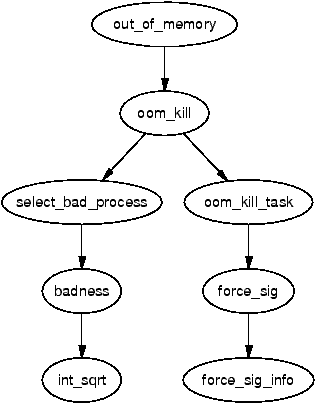
In real case (we met before), keydb-server is a important service we need to keep first, but maybe has another process triggered OOM (or even the keydb-server itself. Idk. But it wasn’t important because we need an evidence to show that) and keydb-server consume lot of memory too, but it can’t be easily killed.
After all, I think we need something like catch syscall event (SIGKILL in this case, thinking a lot about eBPF), the data can be dump process usage in somewhere, this help us investigate what happened at that time.