


SLO Alert for detect and alert service state
Using SLO (Service-Level Objective) for determine issue about Reliability of system is good choice that’s today system using for estimate ability “Serve enduser good enough” or “Detect issues about healthy of system” under view of Engineer. Maybe SLO not bring much value when system is operating stably or in other words “stasifying user” the way we see it from “surface”. However, for evaluate more accurate something what we see requires accurate statistic and from this we can evaluate “quality” system more exactly. So, SREs (Site-Reliability Engineer) using SLO for determine “threshold” that they think it serve enduser “good enough”
There is no problem when system running stably like something we hope. This will be more difficult when system extend over time. At this time, complexity will be linear increase with risk that the system will meet. Identify problems before it happen help SREs have better strategy for response, so target will focus to metrics around SLO.
Idea for determine risks using Error Budget (EB)
It makes sense that our first step would be to define warnings related to “Error Budget (EB) will likely run out in the next X days.”, this more early with target that team defined. That mean, maybe using current SLI (Service-Level Indicator) for calculate Error Rate (ER) of system and ratio it with EB determine before for return result about Budget Remaining (BR).
That idea with key concept is: “If at a time, the amount of EB “burned” will be proportional with severity of problem encountered”
That mean, at a time, the amount of EB more burned <-> The issue is even more concerning
What does this mean ?
Example, we have a cycle for evaluate SLO is 28 days (time_window=28d) and SLO threshold defined is 99.9% (SLO = 0.999) requests received will be handle successful by the server.
-> EB = 1 - SLO = 1 - 0.999 = 0.001
This is request ratio that system Allow handle error in 28d time window. If exceed, “mission fail” (Did not reach the goal).
Let’s say within 28 days, we have total 1 million requests received. According to target we have set, the system will only be allowed for handle failed 1000 requests and 999,000 requests remaining will have to be be handle successful
If our system running stably like something we hope, then after 28 days, 100% EB will be exhausted (corresponding with EB = 0% after 28 days). This means the same thing about Burn rate = 1. This case called “perfect case”
-> When outages occur with system, suppose we calculate and determine that this will exhausted 100% EB after the 14th days (1/2 time_window) -> Burn rate = 2 (EB burn fast double -> This mean we will have problems with double risk).
At this time, we can show charts corresponding between time window and burn rate (with time_window = 30 days in bellow image)
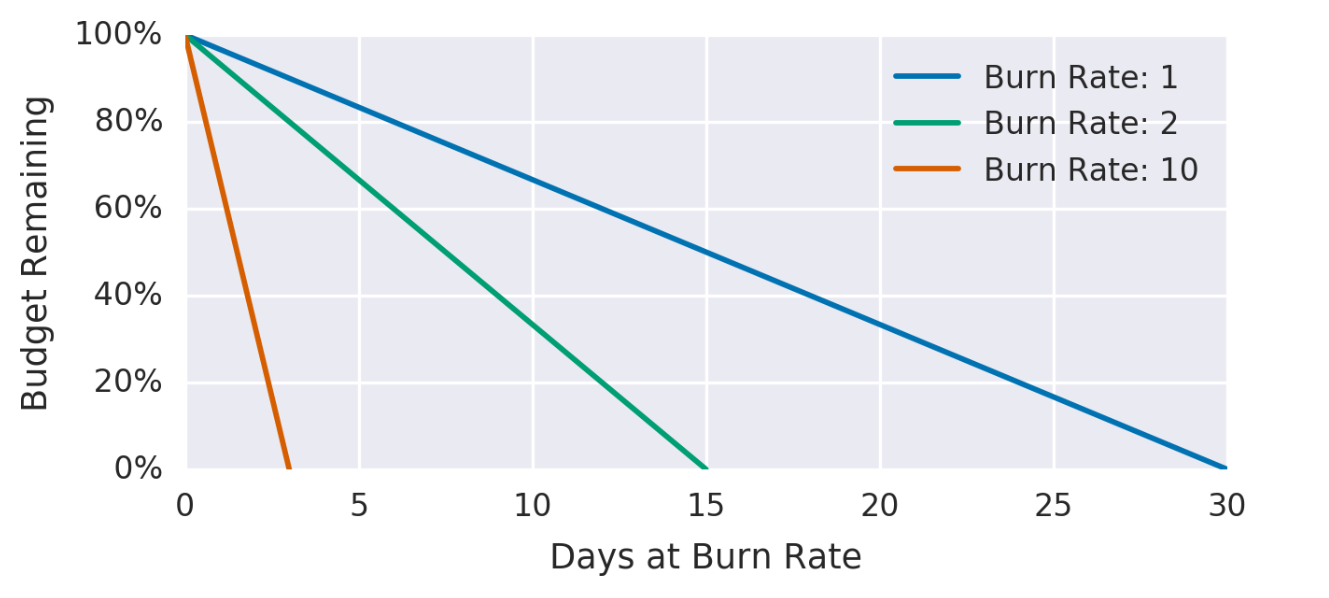
SLO target is set will be considered passed if in time window, amount EB not “exhausted” earlier. This idea base on EB amount consumed corresponding with (BR) in “perfect case” for estimate system health could be worse.
-> The higher the burn rate at SLO time window, the faster EB is exhausted -> the greater the risk.
From there we can be seen evaluating periodically and alert prolems related error budget consumed is necessary.
How evaluate and alert periodically is the question arises now, the following plan we can use for identify EB threshold consume of system for alert when the service has problem.
Solution for identify burn rate
With 100% SLO (SLO = 1) in 28d corresponding 672h system up (always up and not include any incidents in 672h). However, this story is completely unfeasible because any system or service will have downtime when we deploy new feature, resolve incidents. So, SLO we set require will be smaller than 100%
As mentioned above, we have set SLO = 0.999 (99.9%) in 28 days period, this equivalent to:
28 * 24 * 0.999 = 671.328h uptime => allow 0.672h (~ 40.32 minutes) downtime in 28 days period.
=> Error Budget (EB) = 0.001 (0.1%) <=> 40.32 minutes in 28 days, that means in 28 days period we only have 40.32 minutes downtime.
We had been identify EB, next we can define threshold EB consumed to determine problems system or service.
Following idea we discussed above. Let go to a specific example as follow:
“Determine that the system is looking for a problem worth paying attention to when the amount of EB consumed in 1 hour time window is greater than 5%”
Analysis:
We have fully Error budget (EB) in 1 cycle 28 days = (40.32 minutes). Following perfect case, avg a hour we allow maximum use:
40.32 * 28 * 24 = 0.06 minutes (~3.6 seconds) downtime <=> 0.1488% EB/hour
So, we can try to set threshold with value > 5% EB (~2 minutes) to firing an alert.
100% EB corresponding with ~ 40m. At this point, we need define the downtime range so that the service does not impact the previously defined SLO.
With 5% EB per hour -> We can calculate burn rate:
$BR = \dfrac{P \times EBc}{tw}$
With:
- BR: Burn rate.
- EBc: Error budget consumed.
- P: Period for SLO eval.
- tw: Time window. In this case, tw = 1h.
From there, we calulate burn rate limit with 5% EB consumed per hour and we can configurate alerting rule by Burn rate:
$BR = \dfrac{28 \times 24 \times 0.05}{1} = 33.6$
Rule config:
expr:
ErrorRate[1h] < 33.6
However, there is one problem occur:
x 33.6 times EB in 1 hour is fit for give decision service occuring problems make consumes EB significantly compare to EB we set. But, if EB consumed < 33.6 times little a bit, there won’t be any alert (for example ER = 33 times EB) athough it “burn” 100% EB in 20.3h*.
With BR = 33. We calculated Error Budget consumed:
$EBc = \dfrac{BR \times tw}{P} = \dfrac{33 \times 1h}{28 \times 24} = 0.049$
And then, we have time to consume all budget:
$T = \dfrac{1 \times tw}{EBc} = \dfrac{1 \times 1h}{0.049} = 20.3h$
This is overcome by using an additional short time window to detect problems that occur briefly but cause significant to the EB and this require quick response. Additionally, the short window time helps ensure that the chart recovers quickly when the problem is resolved.
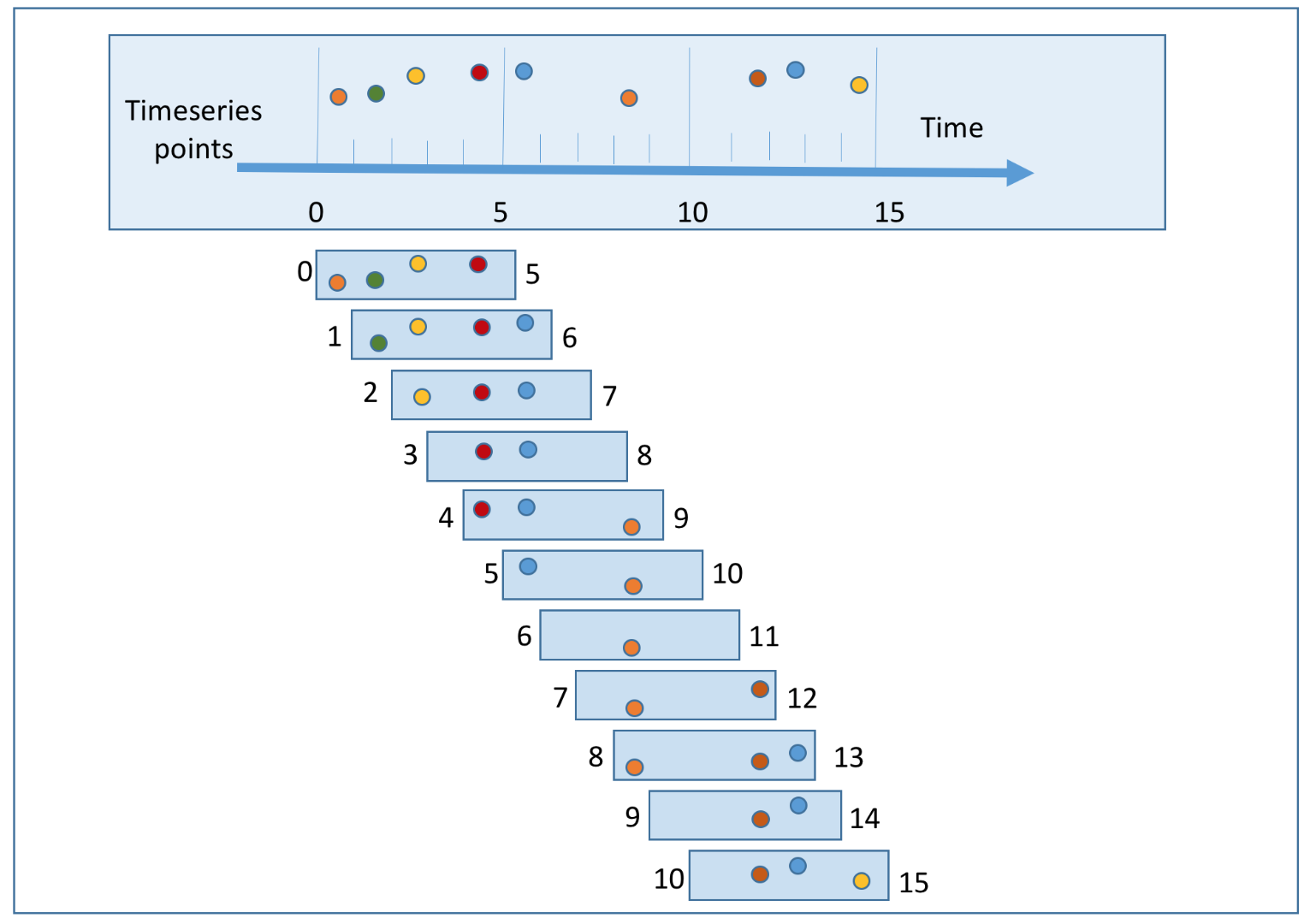
As recommended. We could use short time window = 1/12 long time window with the same burn rate.
Therefore, it is recommended to add an evaluation condition for a short time window to help detect problems make burn significantly EB.
Rule config:
expr:
ER[1h] < 33.6
OR
ER[5m] < 33.6
From there, we can see the use of long time window to identify the risks of EB consumption in the future to have plans or solutions to overcome when that situation continues in the coming days while short time window is used to detect problems that have a significant impact on the system and need to be resolved as soon as possible.
Reference: